.svg)



Advisors can now build and manage their white label, right inside the platform
.svg)
.svg)


For financial advisors who want a client experience that looks and feels like their own, the process just got a lot simpler
Until recently, setting up a white label on our platform meant going through our team. Advisors would reach out, we’d handle the setup, and they’d wait. It worked, but put more steps between advisors and the firm’s branded experience for their clients.
That changed.
White label purchasing, setup, and management are now handled within the platform. Advisors can move forward at their own pace, and our team is here whenever they need us.
What is white label software for financial advisors
A white label lets a financial advisory firm put their brand on our platform. That means their logo, their own sign-in address, their presence. When clients login in, they see their advisor.
For financial advisors, this matters. Trust is built on the platform through consistency. Clients should always feel like they are in the hands of their advisors. A white label can help provide that feeling for clients.
White label setup is now self-serve
One person at the firm takes on the role of white label administrator. The white administrator can be an advisor at the firm. That person purchases and sets up the white label, uploads the firm’s logo, and manages the team from that point forward. This white label administrator is designated as the person who adds team members. The added advisory team members participate under the firm’s branded platform.
All of this now happens directly within the platform. No back-and-forth with our team required.
Purchasing your white label in-platform
When beginning the onboarding process, advisors will see the option to choose an Enterprise subscription. This is the path to a white label. Here is what the process looks like from start to finish:
Step 1: Enter basic information
The administrator enters their name, email address, phone number, and company name. The administrator will not be directed to the next page without their company’s name.
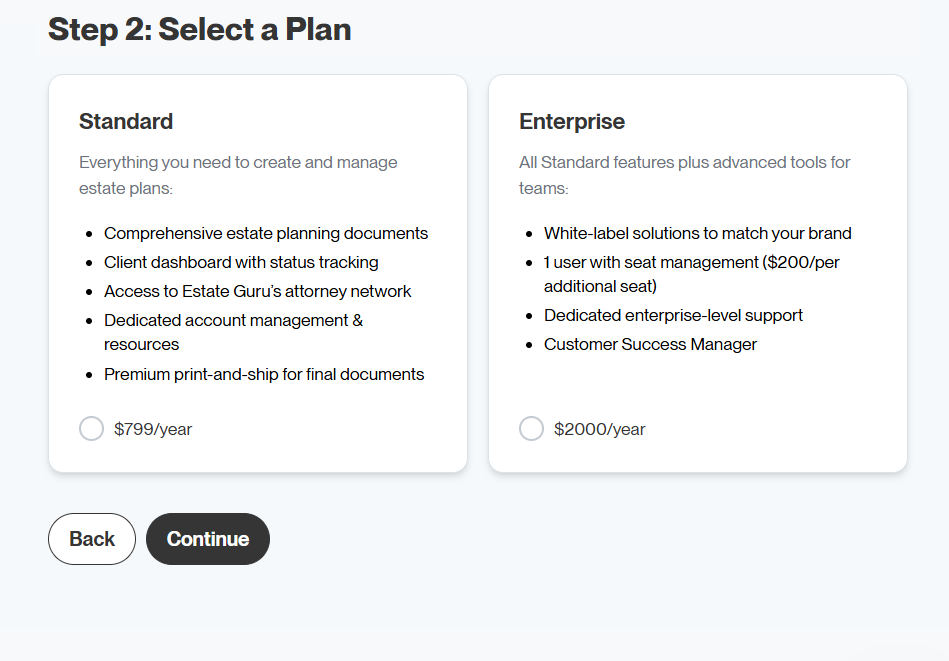
Step 2: Choose an Enterprise Subscription
Choose an Enterprise subscription. Selecting Enterprise signals preparation for establishing a white label. This is what allows a place for your brand to live on our platform.
Step 3: Set up the brand and add team members
This is where the white label takes shape. The administrator chooses a branded subdomain address where their clients will sign in. If the subdomain address is available, it is created automatically.
Enterprise includes one advisor by default. Additional team members can be added on this page. This means that your firm’s advisory team can log in and manage their client accounts. The platform calculates how many advisors will be accessing the platform and calculates the total before checkout. Pricing is tiered: up to ten team members fall into one rate. Eleven or more move into a lower rate that applies to each person. So, at eleven team members, all eleven are priced at a better rate.
.png)
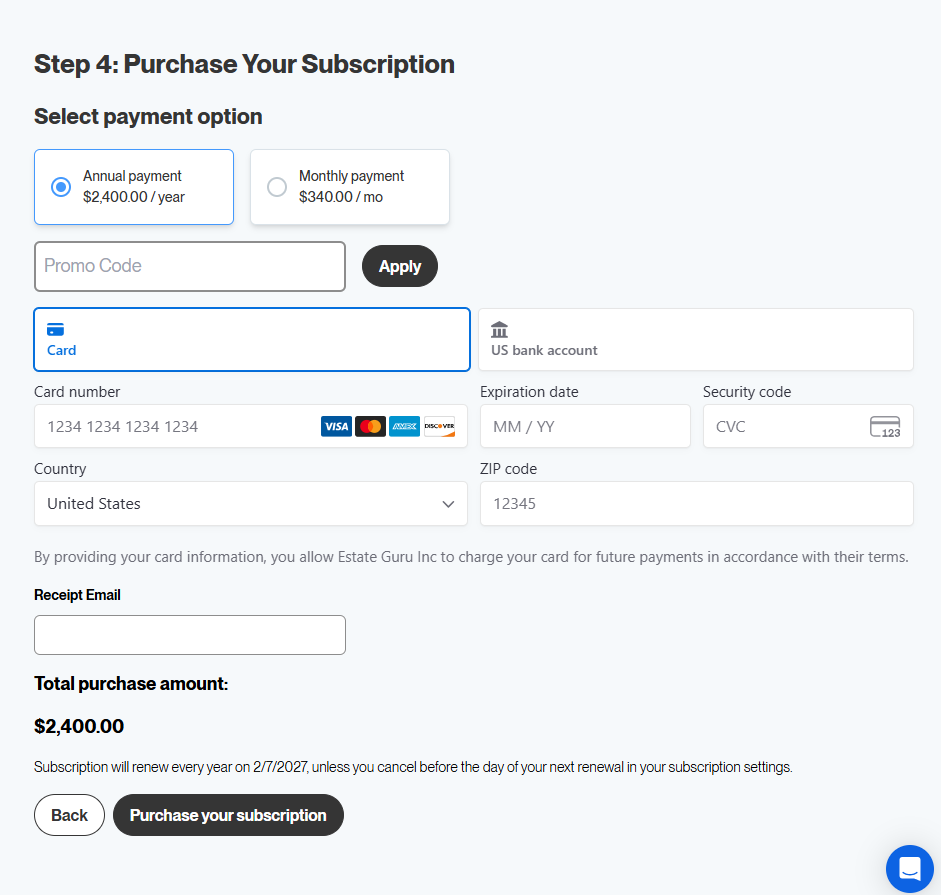
Step 4: complete payment
White label administrators choose between annual and monthly billing, enter their card details, and confirm the purchase. A receipt is sent by email. Subscriptions renew automatically, and can be cancelled any time before the renewal date in the advisor’s subscription settings.
Step 5: verify the account
Check the inbox for the email address used to register. A verification code from us will be waiting there. Enter that code to confirm the account.
Step 6: create login credentials
The administrator creates a username and password. Once that is done, the white label is active. No more calls or emails.
%20.png)
Once the purchase is complete and the account validated, the white label goes live immediately.
Managing team member seats in-platform
Once the white label is live, the administrator manages the team directly within the platform. As a white label administrator, financial advisors can:
- See exactly how many seats are available and how many are in use at any time
- Add new users when seats are available
- Change user roles or deactivate users as the team changes
- Purchase additional seats directly in the platform when needed, without contacting us
The system keeps track of availability automatically for all seats.
The advisor-branded client experience
When advisors or their clients enter the portal, the advisor’s logo appears in the top left. A guided tour is also available for new white label administrators, when setting up the account. This tour walks through the management tools so advisors know exactly where everything is.
What this means for existing white label clients
Once the white label is live, the administrator manages the team directly within the platform. As a white label administrator, financial advisors can:
- See exactly how many seats are available and how many are in use at any time
- Add new users when seats are available
- Change user roles or deactivate users as the team changes
- Purchase additional seats directly in the platform when needed, without contacting us
Why we made white label management self-serve
Advisors shouldn’t have to depend on us for things they can manage themselves.
Our job is to build tools that work well and get out of the way for your business. Needing to contact account management every time an advisor wants to add a team member or adjust their setup creates unnecessary friction.
This update removes friction for many advisors. The white label is now in the hands of the advisor who uses it.
Financial advisor white label: common questions
Can advisors choose their own subdomain?
Yes. During onboarding, the firm’s administrator enters their preferred subdomain. If it’s available, it’s created automatically. If there’s a conflict, they’ll be prompted to choose another.
What’s included in an enterprise subscription?
The Enterprise tier allows a white label subscription. The administrator configures their setup during onboarding, chooses a subdomain, and purchases seats for their team. The total price, including additional seats, is shown before checkout.
Can the advisor administrator add more advisor seats later?
Yes. If the original seats fill up, advisors can purchase additional advisor seats directly within the platform at any time.
Does the advisor’s logo appear automatically once a white label Is set up?
Yes, with one quick step. The administrator will need to upload their logo into the platform first. From that point, the logo will appear in the top left of the platform whenever the advisor or their clients log in.
What happens to an existing white label setup?
Currently, there is no change for existing white label clients. Accounts are managed the same way they have been. We’ll be in touch as new opportunities happen.
Is there a demo available?
Yes. During onboarding, advisors will see the option to book a demo directly with our team. They will be directed to find a time on our team’s calendar that works best for the advisor.
Ready to get started?
Advisors exploring a white label for their practice can get started through the onboarding portal. Select Enterprise during the subscription, and the rest of the process is guided from there.
Questions are always welcome by our team. But with this update, advisors may not need us as often. However, if there are questions, our support team is happy to assist.
Phone: 385-240-6400
Email: support@estateguru.com