.svg)



The platform is changing: here’s what you need to know
.svg)
.svg)

Learn what’s changing in our estate planning platform on February 25, 2026.
Most advisors are already using the updated platform. For those still using Classic, it will be retired on February 25, 2026. If you haven’t explored the updated platform yet, here’s what’s changing and how it helps you manage client estate plans more efficiently.
What does the updated dashboard feature look like?
The visual design is cleaner and more organized than the previous version. Advisors can quickly see which clients need attention, what stage each plan is in, and how clients are progressing through the process.
Client tables
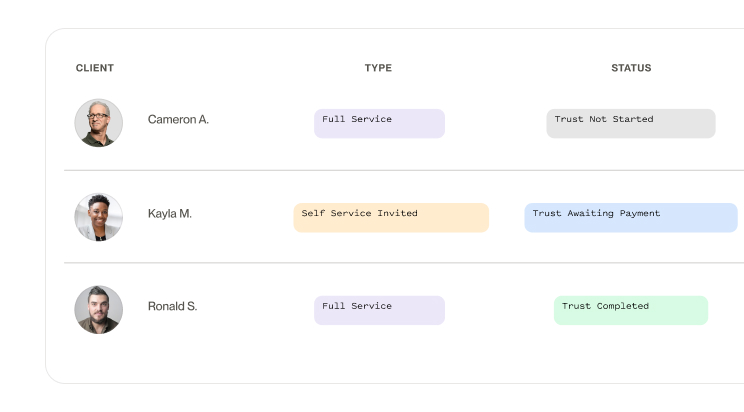
The updated platform provides a clean, organized table that displays all your clients in one view. Each row shows the client’s name, document type (e.g., Single Trust, Married Trust), client service level (i.e., Full Service, Self Service, Assisted), and current document status for the trust and POAs.
At the top, you can filter by name or client number to quickly locate a client. Each client row includes an “Open Details” dropdown on the right. Options include client information, account status, plan documents, assets, deeds, client access, notes, and legal reviews. Advisors can click any of these options to see the progress of each form.
Visual reports
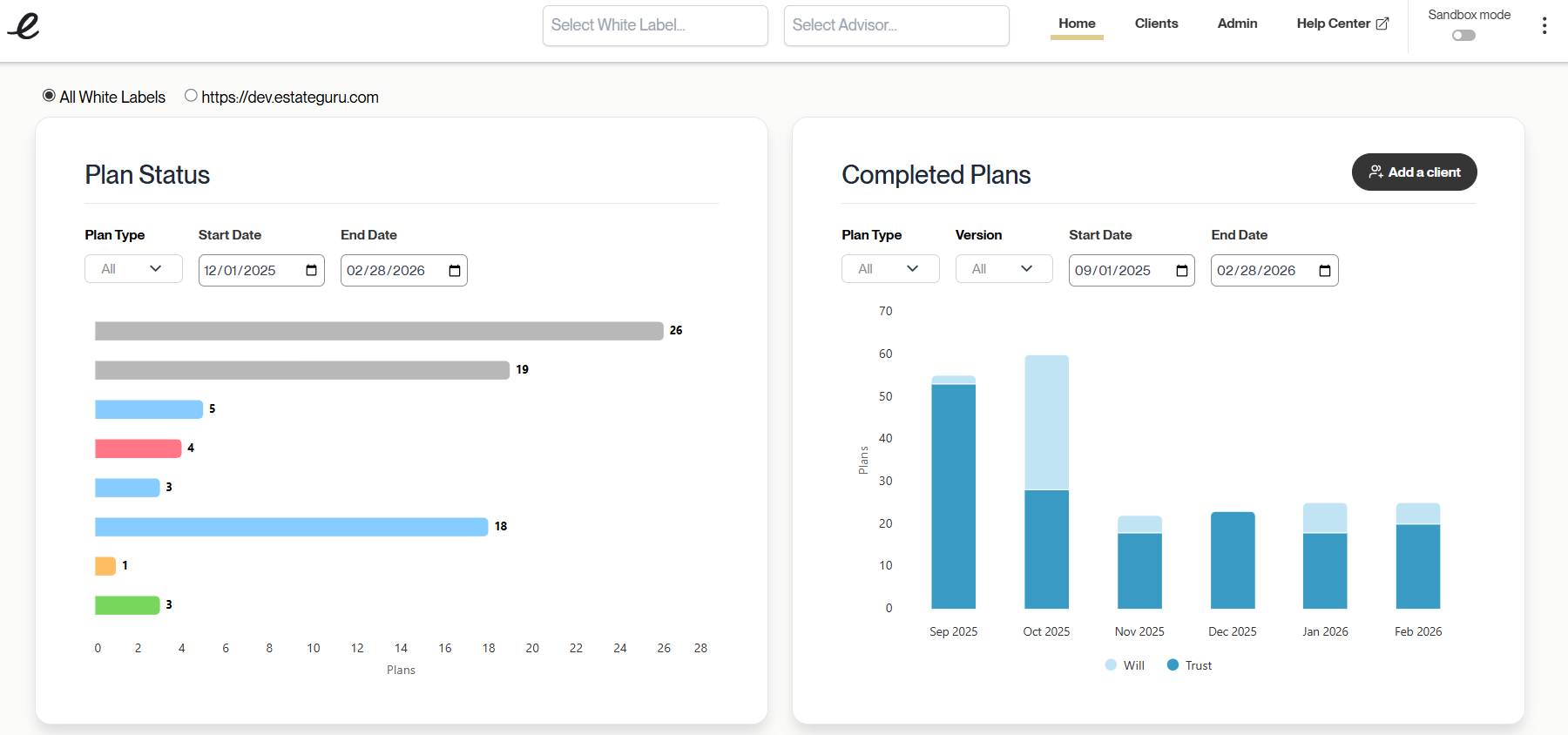
The advisor home dashboard now includes two new reporting charts.
Plan status
The “Plan Status” report shows the total number of plans, broken down by status. Some options include: “not started,” “awaiting payment,” or “shipping pending.” Advisors can filter by plan type (i.e., all plans, just trusts, or just wills) and specific time periods.
Completed plans
The “Completed Plans” report shows the total number of plans, broken down by month. You can filter by plan type (i.e., all, trusts, or wills) and by version (i.e., all plans, original plans only, or revisions only).

Can advisors test features without affecting real client data?
Training new staff or exploring features no longer requires a separate login or switching to a different account. Advisors can turn on "Sandbox mode" with one click from the top right corner of the screen.
Once it’s on, advisors can create sample clients, complete forms, and explore the workflow–just like with a real client. Documents in Sandbox mode are clearly marked as practice and cannot be used or signed.
Sandbox mode is ideal for:
- Training new team members
- Walking clients through the platform
- Exploring features before using them with real clients
Using Sandbox mode helps advisors become more familiar with the platform. Advisors can explore and demonstrate features confidently, knowing real client estate plans remain unchanged.
What features are used to build estate plans faster?
The updated platform addresses issues that created holdups in estate plan creation. It is now less likely that advisors will need to re-enter or track down missing information. Client information can now be uploaded directly, reducing errors in client data.
More help resources
The platform now includes FAQs on key pages (e.g., successor trustees and shipping options). This feature allows clients to get quick answers.
A support help bubble can be found on the bottom-right corner of the screen. Clients can use it to search for articles related to their questions.
More available resources mean fewer questions directed to advisors and faster plan completion.
Bulk asset upload
Clients can now upload their assets as a CSV file instead of typing each one. Once uploaded, assets automatically carry throughout the plan. This eliminates duplicate entries and reduces errors.
Easier document access
Trust documents and assets are clearly organized within the dashboard. Advisors can quickly locate and review client information.
Expanded trust options for married couples
Trusts can now be established for married couples when one spouse is unable to participate due to incapacity.
How is reviewing estate plans easier now?
The updated platform makes it easier to see what is happening with each estate plan and catch concerns early.
Clearer status indicators
Plan statuses are now specific and easier to understand. Completed estate plans that need changes show a “Needs Revisions” status until updates are made.
Organized access permissions
When sharing plans with clients or their participants, it’s now clearer to see who needs what kind of access. Advisors can quickly confirm that permissions are set correctly before sharing.
Preferred investment advisor
Clients can now designate a preferred investment advisor for their trust. This new feature allows trust grantors to establish which advisors their heirs should work with after their passing. Advisors can manage this setting through the white-label settings. Families carry the same advisor relationship through generations.
Do advisors control how much clients participate?
Not every client wants the same level of involvement. Advisors can now select how much each client participates:
- Full Service: You handle everything.
- Assisted: Clients answer questions, and you review and finalize.
- Self-Service: Clients do everything themselves.
The level can be changed later if needed. This feature makes it easier to give each client the right amount of help while keeping control over the important steps.
How can clients better understand their estate plans?
Estate plans are complicated. Even when clients have their documents, they often don’t see the full picture. The new platform shows visual diagrams of estate plans in the client dashboard, making plans easier to understand.
What the diagrams show:
- Who’s involved in the plan
- What property and assets are included
- How assets are distributed (with percentages, time-based schedules, and age-based schedules)
- Conditions for distribution (such as milestone moments like completing a college degree)
Why does this matter for advisors?
The visual dashboard doesn’t just help clients understand their plan. It helps the advisor look more professional when presenting to clients. The clean, visual format shows your practice uses modern tools and builds clients' trust in your knowledge.
Clients and heirs understand the plan more easily. Advisors spend less time explaining details or waiting for additional information that often stalls estate planning.
Key dates to keep in mind
Our team has been preparing for these changes. Anytime you visit the platform, you’ll see a reminder about the transition.
- February 11, 2026: The new platform appears when you log in. You can switch back to the old version for two weeks while you get comfortable.
- February 25, 2026: The old version is retired. Everyone will be on the new platform.
What should financial advisors do before the transition?
- Log in and explore the new platform. Take a look around and become familiar with the updated layout and features.
- Try Sandbox mode. Create sample clients and walk through the workflow without touching real client information.
- Click “Open Details” on a few clients. See how the new client list works and where all the information is now located.
- Check what the clients will see. Review auto-fill information, visual estate plan diagrams, and updated screens.
- Use the help guides. Guides and instructions are available inside the platform where you log in.
Why do our estate planning platform's updated features matter?
The updated estate planning platform eliminates the time advisors spend searching for information, re-entering client details, or re-explaining estate plans. Information flows automatically. Clients see their estate plans visually.
That means more time with clients and less time managing the platform.
Our support team is ready to help answer questions during the transition.
Contact Our Support Team
Phone: 385-240-6400
Email: support@estateguru.com